Custom Domain
Connecting your own domain name to a Vercel deployment — buying a domain, configuring DNS, and getting HTTPS automatically.
Your site is live at my-personal-site.vercel.app. That works. But your client doesn't want to hand out a vercel.app link. They want aurorapublicschool.in.
A custom domain is how you replace the Vercel-assigned URL with your own. After this page, you'll understand how domain names work, how to buy one, and how to connect it to your Vercel deployment in under 15 minutes.
The "Why First" Scenario
You've delivered Aurora Public School to a school. The principal wants to share the parent portal with parents.
They email: "Please send us the website link."
You send:
aurora-git-main-abc123.vercel.appThe principal replies: "This looks unprofessional. Can we have a proper address?"
A domain is a professional address. It costs ₹700–3,000 per year. Without it, your work looks like a development prototype, not a finished product.
Every client project you deliver will have a custom domain. Understanding how they work is a core professional skill.
How Domain Names Work
Every computer on the internet has an IP address — a number like 76.76.21.21. Humans can't remember numbers like that. Domain names are human-readable aliases for IP addresses.
When you type aurorapublicschool.in in your browser:
- Your browser asks a DNS server: "What is the IP address for
aurorapublicschool.in?" - The DNS server looks it up and returns the IP address
- Your browser connects to that IP address and loads the site
DNS records are the settings that tell the internet which IP address a domain name points to. You manage DNS records at whichever company you bought the domain from (GoDaddy, Namecheap, etc.). Vercel tells you exactly what records to add — you just copy and paste them.
The Excel Analogy
Think of a domain name like a hyperlink in Excel. The link text (aurorapublicschool.in) is what people see and click. The actual destination (Vercel's IP address) is what's stored behind it. When Vercel's servers move or change, you update the destination — the link text stays the same.
DNS propagation is like waiting for Excel's auto-save to sync across all devices. The change is made immediately on your end, but every other computer on the internet has to pick up the update. This usually takes 10 minutes to 48 hours.
Step 1 — Buying a Domain
You'll buy a domain from a domain registrar. Two good options:
| Registrar | Website | Notes |
|---|---|---|
| GoDaddy | godaddy.com | Largest registrar, good UI, slightly higher renewal prices |
| Namecheap | namecheap.com | Often cheaper, straightforward DNS management |
Typical costs:
.comdomain: ₹700–1,500 in year 1, ₹1,500–2,500/year after.indomain: ₹400–900/year- Premium domains (common words, short names): can cost thousands — avoid these
How to buy:
Search for your domain
Go to GoDaddy or Namecheap. Type the domain name you want (e.g., aurorapublicschool.in) in the search bar. It will show whether it's available and the price.
Add to cart and check out
Select the domain. When prompted for add-ons (website builder, email hosting, SSL, etc.) — decline all of them. You don't need any extras. Vercel provides free SSL automatically. You don't need the registrar's SSL.
Set the registration period
1 year is fine. Auto-renewal is recommended so the domain doesn't expire while a client is using it.
Complete the purchase
Pay via card or UPI. You'll receive an email confirmation. The domain is now yours.
For training Project 1: A custom domain is optional. The *.vercel.app URL is perfectly functional for your personal website during training. Buy a domain when you're ready to present the project professionally, or when you start working on a client project that requires it.
Step 2 — Adding the Domain to Vercel
Open your project in the Vercel dashboard
Click your project. Go to Settings → Domains (in the left sidebar).
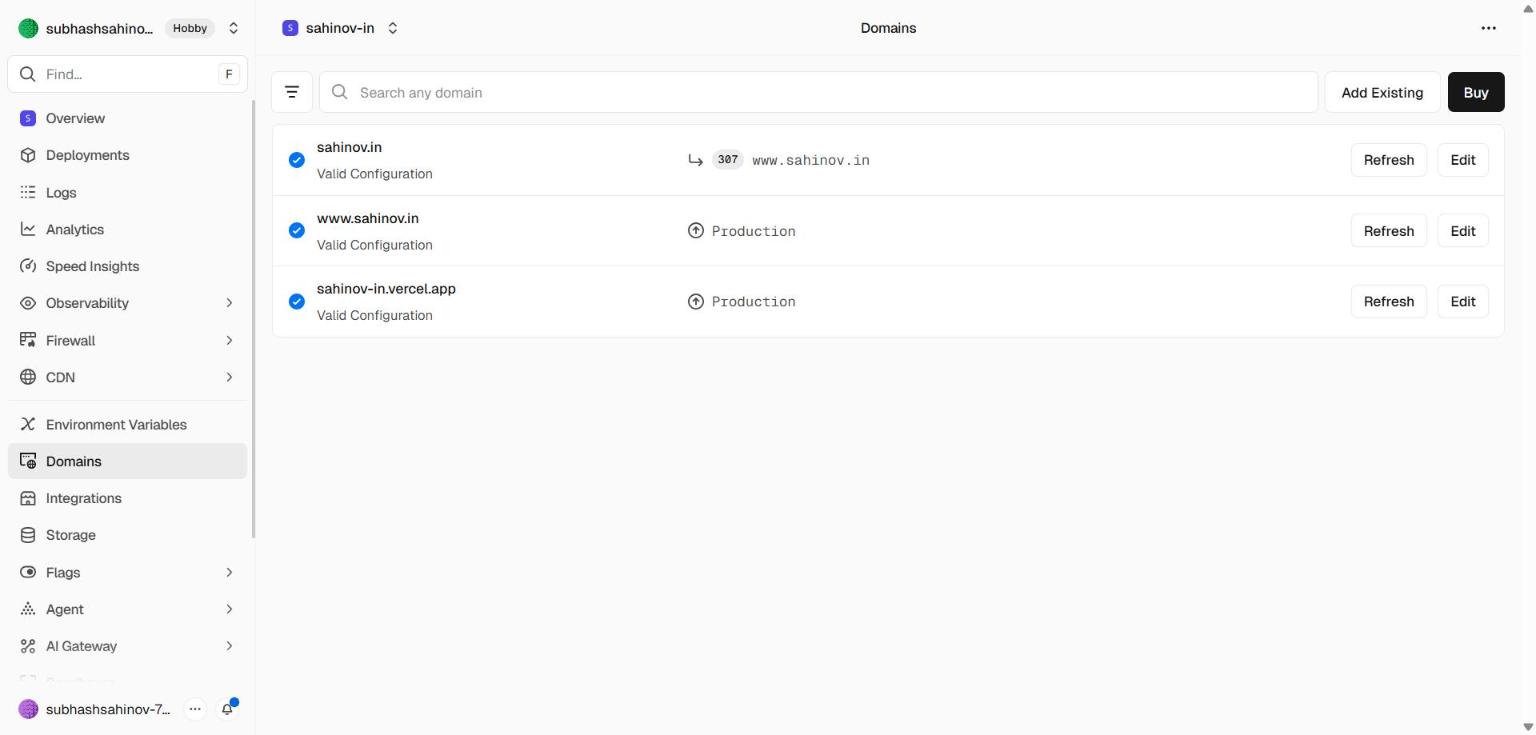 The Domains panel inside project Settings. This is where you add a custom domain and where Vercel will tell you exactly which DNS records to create at your registrar.
Click "Add"
Type your domain name in the field. For example: aurorapublicschool.in
Also add the www version: www.aurorapublicschool.in. Vercel will redirect www to the root automatically once both are added.
Vercel shows you the DNS records to add
Vercel will display one or two records:
For a root domain (aurorapublicschool.in):
- Type:
A - Name:
@ - Value:
76.76.21.21
For the www subdomain (www.aurorapublicschool.in):
- Type:
CNAME - Name:
www - Value:
cns.vercel-dns.com
Copy these values exactly. You'll paste them into your domain registrar in the next step.
Step 3 — Adding DNS Records at Your Registrar
The steps below use GoDaddy as the example. Namecheap has the same concepts with slightly different UI labels.
Log into GoDaddy
Go to godaddy.com and sign in.
Go to "My Products"
Click your account name (top right) → "My Products". Find your domain in the list.
Click "DNS" next to your domain
This opens the DNS management screen. You'll see existing records — most are placeholder records GoDaddy adds by default (A records pointing to a parked page, etc.).
Add the A record for the root domain
Click Add (or Add Record):
- Type:
A - Name:
@(the@symbol means "the root domain itself") - Value:
76.76.21.21(Vercel's IP — use whatever Vercel showed you) - TTL: Leave as default (600 or 1 hour)
Click Save.
Add the CNAME record for www
Click Add again:
- Type:
CNAME - Name:
www - Value:
cns.vercel-dns.com(use whatever Vercel showed you) - TTL: Leave as default
Click Save.
Delete any conflicting A records
If GoDaddy already has an A record for @ pointing to their parked page IP, delete it. You can't have two A records for the same name — the old one will interfere with Vercel's record.
Step 4 — Wait for DNS Propagation
After saving your DNS records, the changes need to spread across the internet's DNS servers. This is called propagation. You cannot speed it up — it's a consequence of how the internet works globally.
| Timeframe | What to expect |
|---|---|
| 0–10 minutes | Change visible to you (your ISP's DNS server updates) |
| 10–60 minutes | Visible to most people globally |
| Up to 48 hours | Full worldwide propagation (rare — usually done in under an hour) |
How to check: Back in Vercel under Settings → Domains, your domain will show one of two statuses:
- Invalid Configuration — DNS records haven't propagated yet, or the records are wrong
- Valid Configuration — DNS is correct and active
Refresh the page every few minutes. When it turns green, your domain is live.
www version should redirect to your site.Step 5 — HTTPS Is Automatic
Once Vercel sees valid DNS, it automatically provisions an SSL certificate for your domain through Let's Encrypt. This gives your site the padlock icon (HTTPS) within a few minutes of DNS going green.
You do nothing. There's no certificate to purchase, no configuration to set, no annual renewal to manage. Vercel handles all of it.
If your domain shows "Valid Configuration" but HTTPS isn't working yet, wait 5–10 minutes. Certificate provisioning happens after DNS validation and takes a few minutes.
Transferring DNS Management to Vercel (Optional)
For convenience, you can transfer your domain's DNS management entirely to Vercel. This means Vercel becomes your DNS host — you manage everything from the Vercel dashboard instead of logging into GoDaddy or Namecheap separately.
Vercel will provide you with nameserver addresses to set at your registrar. This is entirely optional and makes no difference to how your site works — it's only about where you manage DNS records.
For training purposes, keep DNS at your registrar. It's one fewer system to learn right now.
Common Mistakes
Mistake 1: Using www.aurorapublicschool.in in Vercel but browsing aurorapublicschool.in (no www)
Add both the root domain and the www version to Vercel. They need separate DNS records and separate Vercel domain entries.
Mistake 2: Not deleting GoDaddy's existing A record GoDaddy pre-populates A records pointing to their own servers. If you add Vercel's A record without removing the old one, the conflict prevents propagation.
Mistake 3: Checking immediately after saving DNS takes time. Refreshing the Vercel dashboard 30 seconds after saving the records is normal — it will still show Invalid. Give it at least 10 minutes before troubleshooting.
Mistake 4: Buying an SSL from GoDaddy GoDaddy will aggressively try to sell you an SSL certificate during checkout and afterwards. Do not buy it. Vercel provides free SSL automatically for every domain. The GoDaddy SSL would only apply if you were hosting on GoDaddy's servers, which you're not.