AI is not magic — it is a probability engine. Software follows rules; AI predicts the most likely next word. See it live, then look inside the machine.
In Session 1 you prototyped things using AI — a compliance table, a screen layout, a client letter. It felt fast. Almost magical.
Session 2 takes the magic apart — on purpose. You cannot steer what you think is magic. Once you see what AI actually does, it stops being a mysterious oracle and becomes a tool you can aim, trust correctly, and catch when it's wrong.
This session covers the mechanics: how AI produces an answer, the infrastructure stack that runs it, and the factors that determine quality. Claude Code — the tool that puts this AI to work inside your projects — comes in Session 4, after you have the developer tools in place (Session 3).
Last session you ran commands in PowerShell. Now let's show what PowerShell can do at full power.
The block below opens Word, types and formats an audit report, saves it as .docx and exports it as .pdf — then opens Excel, builds a formula-linked invoice with GST and Grand Total — then opens PowerPoint and writes three slides with content. One paste. No mouse.
Copy the entire block below. Paste it into PowerShell. Press Enter. Watch.
# ============================================================# POWER OF CODE — 4 files in one command# Word report | PDF | Excel invoice | PowerPoint deck# Requires: Microsoft Office | Save location: Desktop\AI-Demo# ============================================================$out = "$env:USERPROFILE\Desktop\AI-Demo"New-Item -ItemType Directory -Force -Path $out | Out-NullWrite-Host "`n Folder: $out`n" -ForegroundColor Cyan# ── 1. WORD + PDF ─────────────────────────────────────────────Write-Host " [1/3] Word + PDF ........" -NoNewline$word = New-Object -ComObject Word.Application$word.Visible = $false$doc = $word.Documents.Add()$sel = $word.Selection$sel.Style = "Heading 1"$sel.TypeText("Audit Report — Sunrise Academy Pvt Ltd")$sel.TypeParagraph()$sel.Style = "Normal"$sel.TypeText("Prepared by: CA Subhash Chandra | Sahinov Pvt Ltd")$sel.TypeParagraph()$sel.TypeText("Date: $(Get-Date -Format 'dd MMMM yyyy') | Period: FY 2025-26")$sel.TypeParagraph(); $sel.TypeParagraph()$sel.Style = "Heading 2"$sel.TypeText("Executive Summary")$sel.TypeParagraph()$sel.Style = "Normal"$sel.TypeText("Statutory audit for FY 2025-26 is complete. Books of accounts are in order. All GST returns filed on time. No material discrepancies noted.")$sel.TypeParagraph(); $sel.TypeParagraph()$sel.Style = "Heading 2"$sel.TypeText("Key Financials")$sel.TypeParagraph()$sel.Style = "Normal""Revenue : Rs 1,42,00,000 (18% growth over prior year)","Expenses : Rs 98,50,000 (within approved budget)","Net Profit: Rs 43,50,000 (EBITDA margin 30.6%)","GST payable: Rs 5,12,000 (paid in full)","TDS deducted: Rs 3,87,000 (Form 26AS verified)" | ForEach-Object { $sel.TypeText(" $([char]0x2022) $_") $sel.TypeParagraph()}$doc.SaveAs2("$out\Audit-Report.docx", 16)$doc.ExportAsFixedFormat("$out\Audit-Report.pdf", 17)$doc.Close($false); $word.Quit()[Runtime.InteropServices.Marshal]::ReleaseComObject($word) | Out-NullWrite-Host " done" -ForegroundColor Green# ── 2. EXCEL ──────────────────────────────────────────────────Write-Host " [2/3] Excel ............." -NoNewline$xl = New-Object -ComObject Excel.Application$xl.Visible = $false; $xl.DisplayAlerts = $false$wb = $xl.Workbooks.Add()$ws = $wb.Sheets.Item(1); $ws.Name = "Invoice"$ws.Range("A1:E1").Merge()$ws.Range("A1").Value2 = "SAHINOV PVT LTD — PROFESSIONAL INVOICE"$ws.Range("A1").Font.Size = 14; $ws.Range("A1").Font.Bold = $true$ws.Range("A2").Value2 = "Client: Sunrise Academy Pvt Ltd"$ws.Range("A3").Value2 = "Invoice No: INV-2026-047"$ws.Range("C3").Value2 = "Date: $(Get-Date -Format 'dd-MMM-yyyy')"$hdrs = "Sr.", "Description", "Hours", "Rate (Rs/hr)", "Amount (Rs)"for ($c = 1; $c -le 5; $c++) { $cell = $ws.Cells.Item(5, $c) $cell.Value2 = $hdrs[$c - 1] $cell.Font.Bold = $true $cell.Interior.ColorIndex = 15}$items = @( [pscustomobject]@{ Sr = 1; Desc = "Statutory Audit"; Hours = 12; Rate = 2500 }, [pscustomobject]@{ Sr = 2; Desc = "GST Filing (Q4)"; Hours = 4; Rate = 2000 }, [pscustomobject]@{ Sr = 3; Desc = "TDS Return (Q4)"; Hours = 3; Rate = 2000 }, [pscustomobject]@{ Sr = 4; Desc = "Advisory & Consultation"; Hours = 6; Rate = 3000 })for ($i = 0; $i -lt $items.Count; $i++) { $r = 6 + $i $ws.Cells.Item($r, 1).Value2 = $items[$i].Sr $ws.Cells.Item($r, 2).Value2 = $items[$i].Desc $ws.Cells.Item($r, 3).Value2 = $items[$i].Hours $ws.Cells.Item($r, 4).Value2 = $items[$i].Rate $ws.Cells.Item($r, 5).Formula = "=C${r}*D${r}"}$ws.Cells.Item(10, 4).Value2 = "Sub-total"; $ws.Cells.Item(10, 4).Font.Bold = $true$ws.Cells.Item(10, 5).Formula = "=SUM(E6:E9)"$ws.Cells.Item(11, 4).Value2 = "GST @ 18%"$ws.Cells.Item(11, 5).Formula = "=E10*0.18"$ws.Cells.Item(12, 4).Value2 = "Grand Total"; $ws.Cells.Item(12, 4).Font.Bold = $true$ws.Cells.Item(12, 5).Formula = "=E10+E11"; $ws.Cells.Item(12, 5).Font.Bold = $true$ws.Columns.AutoFit() | Out-Null$wb.SaveAs("$out\Invoice.xlsx", 51)$wb.Close($false); $xl.Quit()[Runtime.InteropServices.Marshal]::ReleaseComObject($xl) | Out-NullWrite-Host " done" -ForegroundColor Green# ── 3. POWERPOINT ─────────────────────────────────────────────Write-Host " [3/3] PowerPoint ........" -NoNewline$ppt = New-Object -ComObject PowerPoint.Application$ppt.Visible = 1$pres = $ppt.Presentations.Add($true)$s1 = $pres.Slides.Add(1, 1)$s1.Shapes.Title.TextFrame.TextRange.Text = "AI Software Development Training"$s1.Shapes.Item(2).TextFrame.TextRange.Text = "Session 1 Recap | $(Get-Date -Format 'MMMM yyyy')"$s2 = $pres.Slides.Add(2, 2)$s2.Shapes.Title.TextFrame.TextRange.Text = "What We Covered in Session 1"$s2.Shapes.Item(2).TextFrame.TextRange.Text = ( "Why build software? What code can do that you cannot", "Command Prompt and PowerShell — your first terminal commands", "Software vs AI — deterministic rules vs probability engine", "The 5 Layer Cake (Jensen Huang / NVIDIA)", "Lovable demo — a working web app built live") -join "`r"$s3 = $pres.Slides.Add(3, 2)$s3.Shapes.Title.TextFrame.TextRange.Text = "The 5 Layer Cake"$s3.Shapes.Item(2).TextFrame.TextRange.Text = ( "Layer 5 Applications — YOU build here", "Layer 4 Models — GPT, Claude, Gemini", "Layer 3 Data — training data + cutoff date", "Layer 2 Infrastructure — AWS, Azure, Google Cloud", "Layer 1 Hardware — NVIDIA GPUs") -join "`r"$pres.SaveAs("$out\Session-1-Recap.pptx", 24)$pres.Close(); $ppt.Quit()[Runtime.InteropServices.Marshal]::ReleaseComObject($ppt) | Out-NullWrite-Host " done" -ForegroundColor Green# ── RESULT ────────────────────────────────────────────────────Write-Host "`n 4 files. 3 Office apps. One command.`n" -ForegroundColor CyanWrite-Host " Audit-Report.docx formatted Word report with headings + bullets"Write-Host " Audit-Report.pdf same report, exported to PDF"Write-Host " Invoice.xlsx invoice with 4 line items, GST, Grand Total"Write-Host " Session-1-Recap.pptx 3-slide PowerPoint deck`n"Write-Host " That is what took 40 minutes by hand, done in under 10 seconds." -ForegroundColor YellowWrite-Host ""Invoke-Item $out
What just happened: PowerShell opened Word, typed and formatted a full audit report, saved it as .docx, and exported it as .pdf — without you opening Word. Then it opened Excel, built a formula-linked invoice with GST calculation and a Grand Total — without you opening Excel. Then it opened PowerPoint and wrote three slides with content — without you opening PowerPoint. All while printing its own progress to the terminal.
That is automating with code. Every step you would have done manually — open app, click around, type, format, save — the script did in sequence, in 10 seconds.
You did not write this script. You copied it and ran it. That is the correct workflow. Describe what you want, let AI generate the script, check that it looks sensible, run it. The skill is knowing what to build and whether the output is correct — not memorising PowerShell syntax.
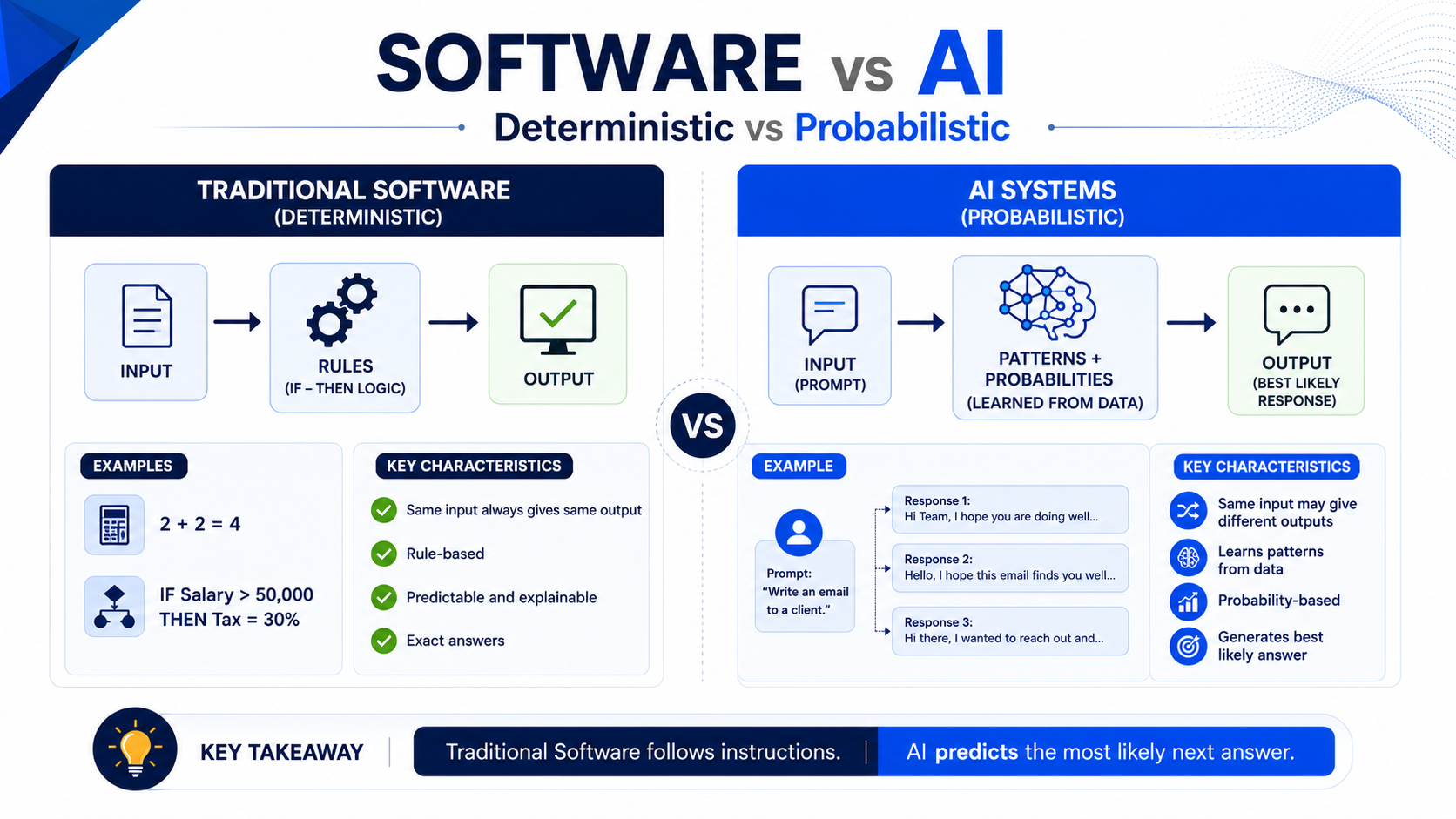
The one-line summary: traditional software is a machine that follows rules. AI is a machine that guesses — very well.
2 + 2 always returns 4. No exceptions. Same input, same output, every single time. That is deterministic.
"Write an email to a client" returns something different every time you run it. That is probabilistic.
Neither is better — they are different tools for different jobs. You want your accounting software to be deterministic (a balance sheet must add up the same way every time). You want AI to be probabilistic (so it can draft, suggest, and create rather than just repeat).
Run the same input through a calculator and through an AI below, and watch the outputs diverge — the calculator never changes, the AI varies every time.
So if AI is "guessing," how does the guess actually work? This is the single most important thing to understand, because everything about steering AI follows from it.
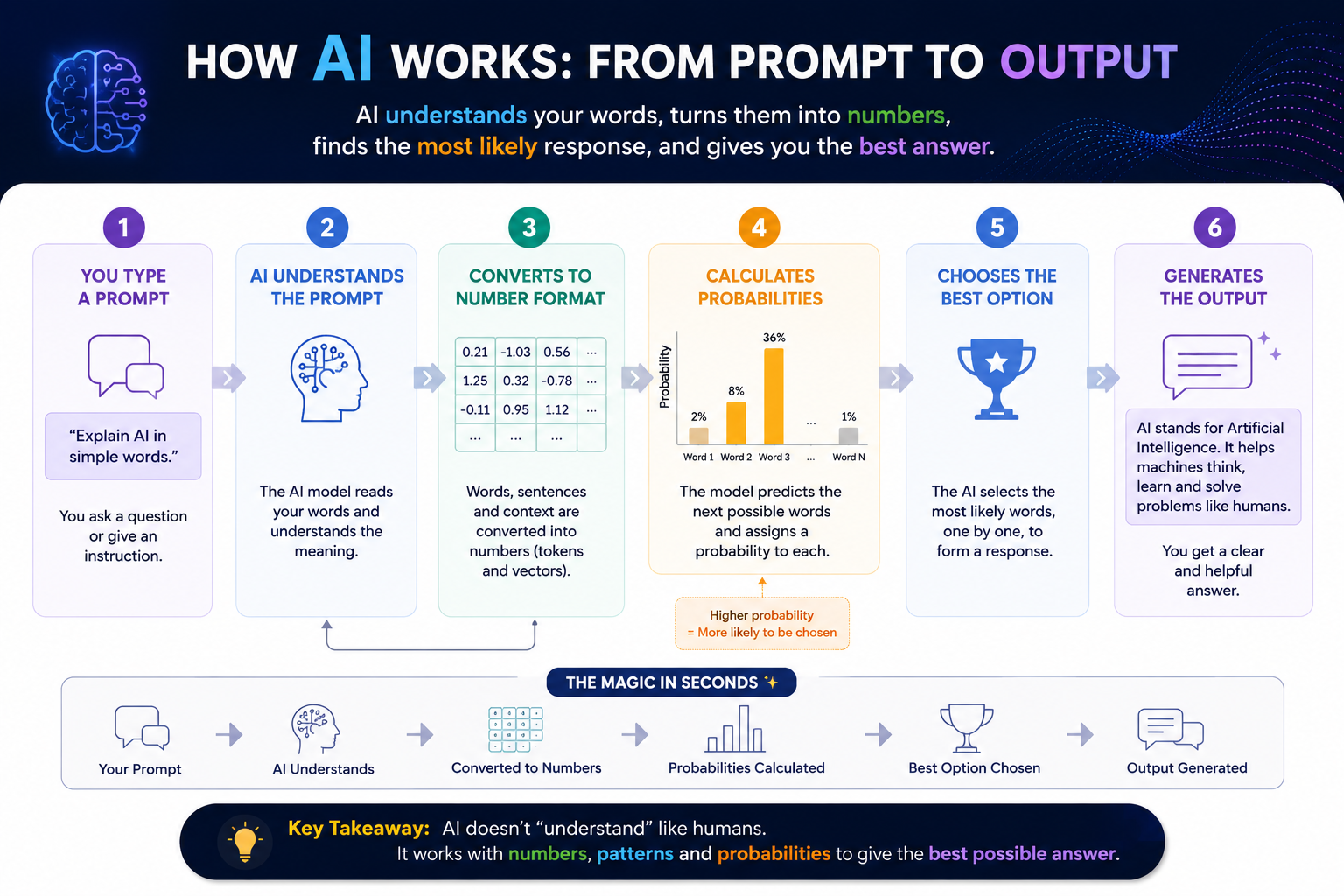
AI does not read words the way you do. It turns everything into numbers.
The AI splits your text into tokens — small chunks, roughly 3–4 characters each. "Reminder" might be one token; a long word splits into several. Punctuation and code produce even more.
This is the key step. The AI cannot work with letters — it converts every token into a number (actually a long list of numbers). To the machine, your sentence is now a grid of numbers, like a spreadsheet.
Given all those numbers, the model calculates, for every possible next word, how likely it is to come next. "Dear" might be 70% likely at the start of an email; "Banana" might be 0.001%.
It chooses a high-probability word, adds it to the sentence, and runs the whole calculation again for the next word — over and over until the response is complete.
Why this matters in practice: AI does not "know" the answer the way you know your own name. It predicts the most statistically likely continuation, one word at a time, based on everything it was trained on. That single fact explains everything:
Why the same prompt gives different answers — there is randomness in which high-probability word it picks.
Why a better prompt gives a better answer — more context shifts the probabilities toward the response you actually want.
Why it sometimes makes things up — a plausible-sounding wrong word can still be high-probability.
Step through the whole pipeline — tokenise → numbers → probabilities → pick — and watch a sentence get built one predicted word at a time: