Edge Functions
Server-side TypeScript that runs on Supabase's servers — for operations that must never happen in the browser.
Why First
A user clicks "Pay now" on your Aurora Public School customer app. Your React app handles the click event.
Here is the question: should your React app call Razorpay directly?
No. Here is why.
Your React app runs in the user's browser. Everything in the browser is visible to everyone. Open DevTools on any website, go to the Sources tab, and you can read the JavaScript that page is running. If you put your Razorpay secret key in your React code — even buried inside a variable — anyone can find it. They can then make API calls to Razorpay using your account. They can charge payments. They can issue refunds. They can do anything your secret key allows.
This is not theoretical. It is one of the most common security incidents for early-stage apps.
The fix is an Edge Function. The secret key never leaves the server. Your React app calls the function. The function — running on Supabase's servers, not the user's browser — makes the Razorpay call using the secret key. It returns only what the browser needs to know: the order ID to open the payment modal.
Excel analogy: A protected VBA macro in a password-locked Excel file on a shared server. Users press a button in their copy of the report. The button calls the macro on the server. The macro runs (with its own credentials to access the accounting system), does the work, and sends back just the result. Users never see the macro code. They cannot edit it. They cannot extract its passwords.
What Edge Functions Are
Edge Functions are TypeScript functions that run on Supabase's servers. They are:
- Server-side: they run on Supabase's infrastructure, not in the user's browser
- HTTP endpoints: each function is a URL your app can call (like an API endpoint)
- Stateless: each call is independent — no session state between calls
- Secure: secrets (API keys, private credentials) stored in Supabase are available to them, but never exposed to the browser
They are called "edge" functions because they run on Supabase's edge network — data centres distributed around the world that respond quickly regardless of where your users are located.
The Edge Functions Panel
In your Supabase dashboard:
- Click Edge Functions in the left sidebar
- If no functions are deployed yet, you see an empty state with a "Get started" button
- Once functions are deployed, each one appears as a row with:
- Function name
- Creation date
- A Logs button — shows every invocation, its status code, and its response time
- An Invoke button — lets you test the function directly from the dashboard
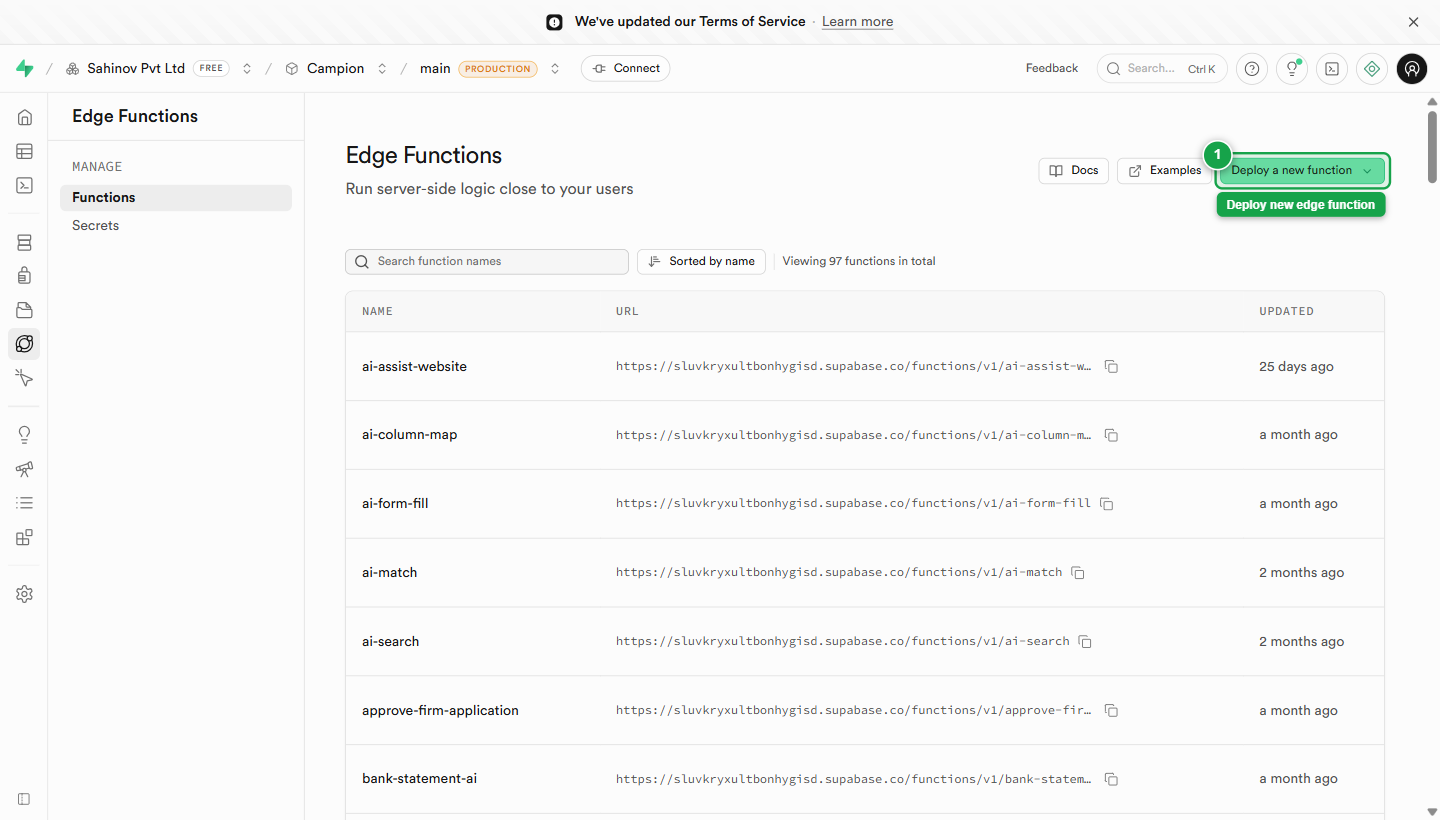 Edge Functions — every deployed function with status, last invoked, and quick links to Logs and Invoke.
Functions You Will Build for Aurora Public School
| Function name | What it does |
|---|---|
create-payment-order | Creates a Razorpay order server-side, returns order ID to the browser |
verify-payment | Verifies Razorpay's payment signature after a transaction completes |
send-email | Sends transactional emails via Resend (fee payment confirmation, OTP, receipts) |
sentry-issues | Proxies the Sentry API to show live error data in the admin dashboard |
send-otp | Sends OTP via MSG91 for phone number verification |
You will not build these in this section. This section is orientation — understanding what Edge Functions are, where they live in the dashboard, and why they exist. The implementation is covered in the Backend & API module.
Secrets — Where Edge Function Credentials Live
Your Edge Functions need API keys to call external services. Those keys must never go in your .env file (which can be accidentally committed to Git) or in your React code (visible in the browser).
They live in Supabase Secrets — encrypted environment variables available only to your Edge Functions:
- In the Supabase dashboard, go to Settings → Edge Functions
- In the Secrets section, click Add new secret
- Enter the secret name and value — for example:
RAZORPAY_KEY_SECRET=rzp_live_abc123...RESEND_API_KEY=re_abc123...
- Click Save
Inside your Edge Function code, you access these as Deno.env.get('RAZORPAY_KEY_SECRET'). They are never visible in the dashboard after saving, and they are never sent to the browser.
 Settings → Edge Functions → Secrets — names visible, values hidden after save.
Never put secret keys in .env for Edge Function use. The .env file is for your React app (frontend environment variables like VITE_SUPABASE_URL). Edge Function secrets go in Supabase Settings → Edge Functions → Secrets. If you put RAZORPAY_KEY_SECRET in .env, Claude Code will likely use it as a VITE_ variable — which would expose it in the browser bundle. Secrets and frontend env vars are completely separate systems.
Deploying Edge Functions
Edge Functions are deployed using the Supabase CLI — a terminal command, not the dashboard. You write the function in your code editor, then run:
The function file lives in your project at supabase/functions/function-name/index.ts. The full deployment workflow is covered in the API & CLI guide.
Viewing Function Logs
When an Edge Function is called — whether from your app or a test — it logs the result. To view logs:
- Click Edge Functions in the sidebar
- Click your function name
- Click the Logs tab
- You see a timeline of every invocation: timestamp, status code (200 = success, 4xx = client error, 5xx = server error), duration in milliseconds, and any console output from your function code
This is where you debug when a payment flow fails, an email doesn't send, or a function call returns an unexpected error. Always check the logs here before assuming the problem is in your React code.
Testing a Function from the Dashboard
- Click Edge Functions → your function name
- Click Invoke
- A panel appears where you can:
- Set the HTTP method (POST, GET, etc.)
- Add headers (e.g.,
Authorization: Bearer <token>) - Write a JSON request body
- Click Invoke to send the test request
- The response appears in the panel — status code, response time, and body
This lets you verify a function works correctly before connecting it to your React app.
Most Edge Functions require an Authorization header. Your function should verify the caller is authenticated (a logged-in user) before doing anything. When testing from the dashboard, generate a test JWT from the Users tab (click a user → generate JWT) and add it as the Bearer token in your test invocation. Testing without auth will tell you the function runs — it won't tell you the auth check works.